Manipulating videos and still images

Registering/Unregistering favorites on images
You can register images as favorites.
- In the main window, select an image to register.
- Select [Edit Ratings and Labels] in the [File] menu.
The [Edit Ratings and Labels] window is displayed.
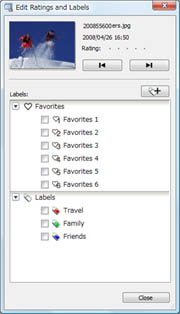
- Put a check (
 ) in the checkbox of a favorite you want to register.
The mark is displayed on the image.
) in the checkbox of a favorite you want to register.
The mark is displayed on the image.
You can register the previous/next image by clicking /
/ .
.
 Hint
Hint- To register an image, you can also drag and drop it onto the filtering screen on the bottom left of the main window.
To unregister images
Display an image to unregister and delete the check () in the checkbox in step 3.
|
Copyright 2008 Sony Corporation |
P0261-01-US |