 |
 |
 |
|
|
|
| |
[ Applicable version ]
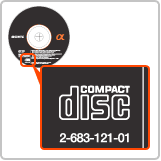
- Number on CD-ROM is 2-683-121-01
[ Operating System(s) ]
|
 |
 |
You should carefully read the following "END-USER LICENSE AGREEMENT" before downloading the update program.
The download of [ LensTable.zip (1,013 bytes) ] file will be started automatically when you click "Agree" button at the bottom of the "END-USER LICENSE AGREEMENT".
After downloading is completed, the downloaded file is automatically extracted to generate LensTable.xml.
If it is no automatically extracted, double-click LensTable.zip. |
[ Installation Instructions ]
- Confirm the following software is installed in your computer.
 |
|
 |
|
Image Data Converter SR Ver.1.1 |
|
 |
|
 |
- Exit Image Data Converter SR Ver.1.1.
- Go to the Applications directory.
- Control-click "Image Data Converter SR" icon.
- Choose "Show Package Contents".
- Go to"Contents/Resources" and move the LensTable.xml file there.
Please choose "Authetificate" and have the file replaced when the message box "The item'LensTable.xml' could not be moved
because 'Resources' cannnot be modified" is displayed.
|
|
|
| |
 |
|
 |
|

