 |
 |
 |
|
|
|
[ Applicable version ]
- Image Data Converter SR Ver.1.1.00.03271
[ Operating System(s) ]
- Windows(R) XP Home Edition/Professional
- Windows(R) 2000 Professional
|
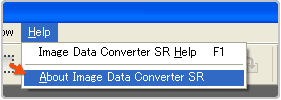
* Check on the HELP menu. |
 |
You should carefully read the following "END-USER LICENSE AGREEMENT" before downloading the update program.
The download of [ IDCSR11_Updater.exe (3,389,320 bytes) ] file will be started automatically when you click "Agree" button at the bottom of the "END-USER LICENSE AGREEMENT". |
[ Before you start ]
Log on as a user with administrative privilege. |
[ Installation Instructions ]
- Confirm the following software is installed in your computer.
 |
|
 |
|
Image Data Converter SR Ver.1.1 |
|
 |
|
 |
- Double-click the downloaded [ IDCSR11_Updater.exe ] file.
The installation of the update program will automatically start.
Follow the instruction on the screen to complete the installation.
 |
To resolve the symptom that the RAW file is not opened with Picture Motion Browser, please follow the steps below.
- After the update, start up Image Data Converter SR Ver.1.1 and open the RAW file that was not opened with Picture Motion Browser.
- Select [Save As...] from the [File] menu to open the [Save As] screen.
- Select [SR2 Files (*.SR2)] for [Save as type], and click the [Save] button.
If the message "... Do you want to replace it?" appears, click [Yes].
| |
|
|
|
 |
|
 |
|

