BEFORE USING THE SOFTWARE, PLEASE READ THIS END USER LICENSE AGREEMENT (“EULA”) CAREFULLY. BY USING THE SOFTWARE YOU ARE ACCEPTING THE TERMS OF THIS EULA. IF YOU DO NOT ACCEPT THE TERMS OF THIS EULA, YOU MAY NOT USE THE SOFTWARE.
This EULA is a legal agreement between you and Sony Electronics Inc. (“SONY”). This EULA governs your rights and obligations regarding the PlayMemories Home software of SONY and/or its third party licensors (including SONY’s affiliates) and their respective affiliates (collectively, the “THIRD-PARTY SUPPLIERS”), together with any updates/upgrades provided by SONY, any printed, on-line or other electronic documentation for such software, and any data files created by operation of such software (collectively, the “SOFTWARE”).
Notwithstanding the foregoing, any software in the SOFTWARE having a separate end user license agreement (including, but not limited to, GNU General Public license and Lesser/Library General Public License) shall be covered by such applicable separate end user license agreement in lieu of the terms of this EULA to the extent required by such separate end user license agreement (“EXCLUDED SOFTWARE”).
The SOFTWARE is licensed, not sold. The SOFTWARE is protected by copyright and other intellectual property laws and international treaties.
All right and title in and to the SOFTWARE (including, but not limited to, any images, photographs, animation, video, audio, music, text and “applets” incorporated into the SOFTWARE) is owned by SONY or one or more of the THIRD-PARTY SUPPLIERS.
SONY grants you a limited license to use the SOFTWARE solely in connection with your compatible device (“DEVICE”) and only for your individual, non-commercial use. SONY and the THIRD-PARTY SUPPLIERS expressly reserve all rights, title and interest (including, but not limited to, all intellectual property rights) in and to the SOFTWARE that this EULA does not specifically grant to you.
You may not copy, publish, adapt, redistribute, attempt to derive source code, modify, reverse engineer, decompile, or disassemble any of the SOFTWARE, whether in whole or in part, or create any derivative works from or of the SOFTWARE unless such derivative works are intentionally facilitated by the SOFTWARE. You may not modify or tamper with any digital rights management functionality of the SOFTWARE. You may not bypass, modify, defeat or circumvent any of the functions or protections of the SOFTWARE or any mechanisms operatively linked to the SOFTWARE. You may not separate any individual component of the SOFTWARE for use on more than one DEVICE unless expressly authorized to do so by SONY. You may not remove, alter, cover or deface any trademarks or notices on the SOFTWARE. You may not share, distribute, rent, lease, sublicense, assign, transfer or sell the SOFTWARE. The software, network services or other products other than SOFTWARE upon which the SOFTWARE’S performance depends might be interrupted or discontinued at the discretion of the suppliers (software suppliers, service suppliers, or SONY). SONY and such suppliers do not warrant that the SOFTWARE, network services or other products will continue to be available, or will operate without interruption or modification.
Notwithstanding the foregoing limited license grant, you acknowledge that the SOFTWARE may include EXCLUDED SOFTWARE. Certain EXCLUDED SOFTWARE may be covered by open source software licenses (“OPEN SOURCE COMPONENTS”), which means any software licenses approved as open source licenses by the Open Source Initiative or any substantially similar licenses, including but not limited to any license that, as a condition of distribution of the software licensed under such license, requires that the distributor make the software available in source code format. If and to the extent disclosure is required, please visit oss.sony.net/Products/Linux or other SONY-designated web site for a list of applicable OPEN SOURCE COMPONENTS included in the SOFTWARE from time to time, and the applicable terms and conditions governing its use. Such terms and conditions may be changed by the applicable third party at any time without liability to you. To the extent required by the licenses covering EXCLUDED SOFTWARE, the terms of such licenses will apply in lieu of the terms of this EULA. To the extent the terms of the licenses applicable to EXCLUDED SOFTWARE prohibit any of the restrictions in this EULA with respect to such EXCLUDED SOFTWARE, such restrictions will not apply to such EXCLUDED SOFTWARE. To the extent the terms of the licenses applicable to OPEN SOURCE COMPONENTS require SONY to make an offer to provide source code in connection with the SOFTWARE, such offer is hereby made.
The SOFTWARE may be capable of being used by you to view, store, process and/or use content created by you and/or third parties. Such content may be protected by copyright, other intellectual property laws, and/or agreements. You agree to use the SOFTWARE only in compliance with all such laws and agreements that apply to such content. You acknowledge and agree that SONY may take appropriate measures to protect the copyright of content stored, processed or used by the SOFTWARE. Such measures include, but are not limited to, counting the frequency of your backup and restoration through certain SOFTWARE features, refusal to accept your request to enable restoration of data, and termination of this EULA in the event of your illegitimate use of the SOFTWARE.
PLEASE ALSO NOTE THAT THE SOFTWARE MAY BE DESIGNED TO BE USED WITH CONTENT AVAILABLE THROUGH ONE OR MORE CONTENT SERVICES (“CONTENT SERVICE”). USE OF THE SERVICE AND THAT CONTENT IS SUBJECT TO THE TERMS OF SERVICE OF THAT CONTENT SERVICE. IF YOU DECLINE TO ACCEPT THOSE TERMS, YOUR USE OF THE SOFTWARE WILL BE LIMITED. YOU ACKNOWLEDGE AND AGREE THAT CERTAIN CONTENT AND SERVICES AVAILABLE THROUGH THE SOFTWARE MAY BE PROVIDED BY THIRD PARTIES OVER WHICH SONY HAS NO CONTROL. USE OF THE CONTENT SERVICE REQUIRES AN INTERNET CONNECTION. THE CONTENT SERVICE MAY BE DISCONTINUED AT ANY TIME.
You acknowledge and agree that access to certain SOFTWARE features may require an Internet connection for which you are solely responsible. Further, you are solely responsible for payment of any third party fees associated with your Internet connection, including but not limited to Internet service provider or airtime charges. Operation of the SOFTWARE may be limited or restricted depending on the capabilities, bandwidth or technical limitations of your Internet connection and service. The provision, quality and security of such Internet connectivity are the sole responsibility of the third party providing such service.
You agree to comply with all export and re-export restrictions and regulations of the Department of Commerce and other United States agencies and authorities, and not to transfer, or authorize the transfer, of the SOFTWARE to a prohibited country or otherwise in violation of any such restrictions or regulations.
Use, duplication, or disclosure by the United States Government is subject to restriction as set forth in subparagraph (c) (1) and (2) of the Commercial Computer Software-Restricted Rights at 48 C.F.R. § 52.227-19, as applicable. The manufacturer solely for purposes of this section is Sony Electronics Inc., 16530 Via Esprillo, San Diego, CA 92127.
The SOFTWARE is not fault-tolerant and is not designed, manufactured or intended for use or resale as on-line control equipment in hazardous environments requiring fail-safe performance, such as in the operation of nuclear facilities, aircraft navigation or communication systems, air traffic control, direct life support machines, or weapons systems, in which the failure of the SOFTWARE could lead to death, personal injury, or severe physical or environmental damage (“HIGH RISK ACTIVITIES”). SONY, each of the THIRD-PARTY SUPPLIERS, and each of their respective affiliates specifically disclaim any express or implied warranty, duty or condition of fitness for HIGH RISK ACTIVITIES.
You acknowledge and agree that use of the SOFTWARE is at your sole risk and that you are responsible for use of the SOFTWARE. The SOFTWARE is provided “AS IS,” without warranty, duty or condition of any kind.
SONY AND EACH OF THE THIRD-PARTY SUPPLIERS (for purposes of this Section, SONY and each of the THIRD-PARTY SUPPLIERS shall be collectively referred to as “SONY”) EXPRESSLY DISCLAIM ALL WARRANTIES, DUTIES OR CONDITIONS, EXPRESS OR IMPLIED, INCLUDING, BUT NOT LIMITED TO, THE IMPLIED WARRANTIES OF MERCHANTABILITY, NONINFRINGEMENT AND FITNESS FOR A PARTICULAR PURPOSE. SONY DOES NOT WARRANT OR MAKE ANY CONDITIONS OR REPRESENTATIONS (A) THAT THE FUNCTIONS CONTAINED IN ANY OF THE SOFTWARE WILL MEET YOUR REQUIREMENTS OR THAT THEY WILL BE UPDATED, (B) THAT THE OPERATION OF ANY OF THE SOFTWARE WILL BE CORRECT OR ERROR-FREE OR THAT ANY DEFECTS WILL BE CORRECTED, (C) THAT THE SOFTWARE WILL NOT DAMAGE ANY OTHER SOFTWARE, HARDWARE OR DATA, (D) THAT ANY SOFTWARE, NETWORK SERVICES (INCLUDING THE INTERNET) OR PRODUCTS (OTHER THAN THE SOFTWARE) UPON WHICH THE SOFTWARE’S PERFORMANCE DEPENDS WILL CONTINUE TO BE AVAILABLE, UNINTERRUPTED OR UNMODIFIED, AND (E) REGARDING THE USE OR THE RESULTS OF THE USE OF THE SOFTWARE IN TERMS OF ITS CORRECTNESS, ACCURACY, RELIABILITY, OR OTHERWISE.
NO ORAL OR WRITTEN INFORMATION OR ADVICE GIVEN BY SONY OR AN AUTHORIZED REPRESENTATIVE OF SONY SHALL CREATE A WARRANTY, DUTY OR CONDITION OR IN ANY WAY INCREASE THE SCOPE OF THIS WARRANTY. SHOULD THE SOFTWARE PROVE DEFECTIVE YOU ASSUME THE ENTIRE COST OF ALL NECESSARY SERVICING, REPAIR OR CORRECTION. SOME JURISDICTIONS DO NOT ALLOW THE EXCLUSION OF IMPLIED WARRANTIES, SO THESE EXCLUSIONS MAY NOT APPLY TO YOU.
SONY AND EACH OF THE THIRD-PARTY SUPPLIERS (for purposes of this Section, SONY and each of the THIRD-PARTY SUPPLIERS shall be collectively referred to as “SONY”) SHALL NOT BE LIABLE FOR ANY INCIDENTAL OR CONSEQUENTIAL DAMAGES FOR BREACH OF ANY EXPRESS OR IMPLIED WARRANTY, BREACH OF CONTRACT, NEGLIGENCE, STRICT LIABILITY OR UNDER ANY OTHER LEGAL THEORY RELATED TO THE SOFTWARE, INCLUDING, BUT NOT LIMITED TO, ANY DAMAGES ARISING OUT OF LOSS OF PROFITS, LOSS OF REVENUE, LOSS OF DATA, LOSS OF USE OF THE SOFTWARE OR ANY ASSOCIATED HARDWARE, DOWN TIME AND USER’S TIME, EVEN IF ANY OF THEM HAVE BEEN ADVISED OF THE POSSIBILITY OF SUCH DAMAGES. IN ANY CASE, EACH AND ALL OF THEIR AGGREGATE LIABILITY UNDER ANY PROVISION OF THIS EULA SHALL BE LIMITED TO THE AMOUNT ACTUALLY PAID FOR THE SOFTWARE. SOME JURISDICTIONS DO NOT ALLOW THE EXCLUSION OR LIMITATION OF INCIDENTAL OR CONSEQUENTIAL DAMAGES, SO THE ABOVE EXCLUSION OR LIMITATION MAY NOT APPLY TO YOU.
You acknowledge and agree that SONY and its affiliates, partners and agents may read, collect, transfer, process and store certain information collected from the SOFTWARE, including but not limited to information about (i) the SOFTWARE and (ii) the software applications, contents and peripheral devices that interact with your DEVICE and the SOFTWARE (“Information”). Information includes, but is not limited to: (1) unique identifiers relating to your DEVICE and its components; (2) performance of the DEVICE, the SOFTWARE and their components; (3) configurations of your DEVICE, the SOFTWARE and the software applications, contents and peripheral devices that interact with the DEVICE and the SOFTWARE; (4) use and frequency of use of the functions of (x) the SOFTWARE, and (y) the software applications, contents and peripheral devices that interact with the SOFTWARE; and (5) location data, as indicated below. SONY and its affiliates, partners and agents may use and disclose Information subject to applicable laws in order to improve its products and services or to provide products or services to you. Such uses include, but are not limited to: (a) administering the functionalities of the SOFTWARE; (b) to improve, service, update or upgrade the SOFTWARE; (c) improving, developing and enhancing the current and future products and services of SONY and other parties; (d) to provide you with information about the products and services offered by SONY and other parties; (e) complying with applicable laws or regulations; and (f) to the extent offered, providing you with location-based services of SONY and other parties, as indicated below. In addition, SONY retains the right to use Information to protect itself and third parties from illegal, criminal or harmful conduct.
Certain services available through the SOFTWARE may rely upon location information, including, but not limited to, the geographic location of the DEVICE. You acknowledge that for the purpose of providing such services, SONY, the THIRD-PARTY SUPPLIERS or their partners may collect, archive, process and use such location data, and that such services are governed by the privacy policies of SONY or such third party. By using any such services, you agree that you have reviewed the privacy policies applicable to such services and consent to such activities.
SONY, its affiliates, partners and agents will not intentionally use Information to personally identify the owner or user of the SOFTWARE without your knowledge or consent. Any use of Information will be in accordance with the privacy policies of SONY or such third party. SONY’s current privacy policy is located at: www.sony.com/selprivacy.
Please contact applicable third parties for privacy policies relating to personally identifiable and other information you provide when you use or access third party software or services.
Information may be processed, stored or transferred to SONY, its affiliates or agents which are located in countries outside of your country of residence. Data protection and information privacy laws in certain countries may not offer the same level of protection as your country of residence and you may have fewer legal rights in relation to Information processed and stored in, or transferred to, such countries. SONY will use reasonable efforts to take appropriate technical and organizational steps to prevent unauthorized access to or disclosure of Information, but does not warrant it will eliminate all risk of misuse of such Information.
From time to time, SONY or the THIRD-PARTY SUPPLIERS may automatically update or otherwise modify the SOFTWARE, including, but not limited to, for purposes of enhancement of security functions, error correction and improvement of functions, at such time as you interact with SONY’s or third parties’ servers, or otherwise. Such updates or modifications may delete or change the nature of features or other aspects of the SOFTWARE, including, but not limited to, functions you may rely upon. You acknowledge and agree that such activities may occur at SONY’s sole discretion and that SONY may condition continued use of the SOFTWARE upon your complete installation or acceptance of such update or modifications. Any updates/modifications shall be deemed to be, and shall constitute part of, the SOFTWARE for purposes of this EULA. By acceptance of this EULA, you consent to such update/modification.
This EULA and SONY’s privacy policy, each as amended and modified from time to time, together constitute the entire agreement between you and SONY with respect to the SOFTWARE. The failure of SONY to exercise or enforce any right or provision of this EULA shall not constitute a waiver of such right or provision. If any part of this EULA is held invalid, illegal, or unenforceable, that provision shall be enforced to the maximum extent permissible so as to maintain the intent of this EULA, and the other parts will remain in full force and effect. The United Nations Convention on Contracts for the International Sale of Goods shall not apply to the SOFTWARE or this EULA. Furthermore, this EULA will not be governed or interpreted in any way by referring to any law based on the Uniform Computer Information Transactions Act (UCITA) or any other act derived from or related to UCITA.
ANY “DISPUTE” THAT IS NOT RESOLVED THROUGH THE INFORMAL NEGOTIATION PROCESS DESCRIBED ABOVE SHALL BE RESOLVED EXCLUSIVELY THROUGH BINDING ARBITRATION. “DISPUTE” is defined as any disagreement, cause of action, claim, controversy, or proceeding between you and any Sony entity related to or arising out of the SOFTWARE or this EULA. DISPUTE is to be given the broadest possible meaning that will be enforced. If a DISPUTE arises, you agree to first give notice to SONY by contacting Sony Electronics Inc. at 16530 Via Esprillo, MZ 1105, San Diego, CA 92127, Attn: Legal Department, and engaging in good faith negotiations to attempt to resolve any DISPUTE for at least 14 days, except that you or Sony (or any of its affiliates) may skip this informal negotiation procedure for DISPUTE enforcing, protecting, or concerning the validity of intellectual property rights.
To begin arbitration, either you or SONY must make a written demand to the other for arbitration. The arbitration will take place before a single arbitrator. It will be administered in keeping with the Expedited Procedures of the Commercial Arbitration Rules, and the Supplementary Proceedings for Consumer-Related disputes when applicable (“Rules”) of the American Arbitration Association (“AAA”) in effect when the claim is filed. You may get a copy of AAA’s Rules by contacting AAA at (800) 778-7879 or visiting www.adr.org. The filing fees to begin and carry out arbitration will be shared between you and SONY, but in no event shall your fees ever exceed the amount allowable by the special rules for Consumers Disputes provided for by AAA, at which point SONY will cover all additional administrative fees and expenses. This does not prohibit the arbitrator from giving the winning party their fees and expenses of the arbitration when appropriate pursuant to the Rules. Unless you and SONY agree differently, the arbitration will take place in the county and state where you live, and applicable federal or state law shall govern the substance of any DISPUTE. The Federal Arbitration Act, 9 U.S.C. § 1, et seq., will govern the arbitration itself and not any state law on arbitration. The arbitrator’s decision will be binding and final, except for a limited right of appeal under the Federal Arbitration Act. The arbitrator may award declaratory or injunctive relief only in favor of the party seeking relief, and only to the extent necessary to provide relief warranted by that party’s individual claim. Any court with jurisdiction over the parties may enforce the arbitrator’s decision.
Despite the provisions set forth above, you have the right to litigate any DISPUTE in small claims court or other similar court of limited jurisdiction, to the extent the amount at issue does not exceed $15,000, and as long as such court has proper jurisdiction and all other requirements (including amount in controversy) are satisfied.
YOU UNDERSTAND AND ACKNOWLEDGE THAT BY AGREEING TO BINDING ARBITRATION, YOU ARE GIVING UP THE RIGHT TO LITIGATE (OR PARTICIPATE IN AS A PARTY OR CLASS MEMBER) ANY DISPUTES IN COURT BEFORE A JUDGE OR JURY. ANY DISPUTE RESOLUTION PROCEEDING WILL BE CONDUCTED ONLY ON AN INDIVIDUAL BASIS, AND BOTH PARTIES AGREE NOT TO HAVE ANY DISPUTE HEARD AS A CLASS ACTION, REPRESENTATIVE ACTION, CONSOLIDATED ACTION, OR PRIVATE ATTORNEY GENERAL ACTION, UNLESS ALL PARTIES INVOLVED IN THE DISPUTE SPECIFICALLY AGREE TO DO SO IN WRITING FOLLOWING INITIATION OF THE ARBITRATION.
IF YOU DO NOT WISH TO BE BOUND BY THE BINDING ARBITRATION PROVISION AND/OR THE CLASS ACTION WAIVER ABOVE, THEN: (1) YOU MUST NOTIFY SONY IN WRITING WITHIN 30 DAYS OF THE DATE THAT YOU FIRST USE THE SOFTWARE OR AGREE TO THIS EULA, WHICHEVER OCCURS FIRST; (2) YOUR WRITTEN NOTIFICATION MUST BE MAILED TO SONY ELECTRONICS INC., 16530 VIA ESPRILLO, MZ 1105, SAN DIEGO CA 92127, ATTN: LEGAL DEPARTMENT; AND (3) YOUR WRITTEN NOTIFICATION MUST INCLUDE: (A) YOUR NAME; (B) YOUR ADDRESS; (C) THE DATE YOU FIRST USED THE SOFTWARE OR AGREED TO THIS EULA; AND (D) A CLEAR STATEMENT THAT YOU DO NOT WISH TO RESOLVE DISPUTES WITH ANY SONY ENTITY THROUGH ARBITRATION AND/OR TO BE BOUND BY THE CLASS ACTION WAIVER.
Despite anything to the contrary in this EULA, you may reject changes made to the binding arbitration provision and class action waiver if: (1) you’ve already begun authorized use of the SOFTWARE at the time the change was/is made; and (2) you mail written notice to the address in the immediately preceding paragraph within 30 days after the particular change was/is made. Should such a situation arise, you will still be bound by the DISPUTE procedures you previously agreed to and existing before the change you rejected was made.
Any DISPUTE determined not subject to arbitration and not initiated in small claims court will be litigated by either party in a court of competent jurisdiction in either the superior court for the County of San Diego or in the United States District Court for the Southern District of California.
Notwithstanding anything contained in this EULA to the contrary, you acknowledge and agree that any violation of or non-compliance with this EULA by you will cause irreparable harm to SONY, for which monetary damages would be inadequate, and you consent to SONY obtaining any injunctive or equitable relief that SONY deems necessary or appropriate in such circumstances. SONY may also take any legal and technical remedies to prevent violation of and/or to enforce this EULA, including, but not limited to, immediate termination of your use of the SOFTWARE, if SONY believes in its sole discretion that you are violating or intend to violate this EULA. These remedies are in addition to any other remedies SONY may have at law, in equity or under contract.
Without prejudice to any of its other rights, SONY may terminate this EULA if you fail to comply with any of its terms. In case of such termination, you must: (i) cease all use, and destroy any copies, of the SOFTWARE; (ii) comply with the requirements in the section below entitled “Your Account Responsibilities”.
SONY RESERVES THE RIGHT TO AMEND ANY OF THE TERMS OF THIS EULA AT ITS SOLE DISCRETION BY POSTING NOTICE ON A SONY DESIGNATED WEB SITE, BY EMAIL NOTIFICATION TO AN EMAIL ADDRESS PROVIDED BY YOU, BY PROVIDING NOTICE AS PART OF THE PROCESS IN WHICH YOU OBTAIN UPGRADES/UPDATES OR BY ANY OTHER LEGALLY RECOGNIZABLE FORM OF NOTICE. If you do not agree to the amendment, you should promptly contact SONY for instructions. Your continued use of the SOFTWARE after the effective date of any such notice shall be deemed your agreement to be bound by such amendment.
Each THIRD-PARTY SUPPLIER is an express intended third-party beneficiary of, and shall have the right to enforce, each provision of this EULA with respect to the SOFTWARE of such party.
Should you return your DEVICE to its place of purchase, sell or otherwise transfer your DEVICE, or if this EULA is terminated, you are responsible for and must uninstall the SOFTWARE from the DEVICE and delete any and all accounts you may have established on DEVICE or are accessible through the SOFTWARE. You are solely responsible for maintaining the confidentiality of any accounts you have with SONY or third parties and any usernames and passwords associated with your use of the DEVICE.
Should you have any questions concerning this EULA, you may contact SONY by writing to SONY at: Sony Electronics Inc., 16530 Via Esprillo, San Diego, CA 92127.
Copyright © 2012-2013 Sony Electronics Inc. All rights reserved.
These license terms are an agreement between Microsoft Corporation (or based on where you live, one of its affiliates) and you. Please read them. They apply to the software named above, which includes the media on which you received it, if any. The terms also apply to any Microsoft
* updates,
* supplements,
* Internet-based services, and
* support services
for this software, unless other terms accompany those items. If so, those terms apply.
BY USING THE SOFTWARE, YOU ACCEPT THESE TERMS. IF YOU DO NOT ACCEPT THEM, DO NOT USE THE SOFTWARE.
If you comply with these license terms, you have the rights below.
1. INSTALLATION AND USE RIGHTS. You may install and use any number of copies of the software on your devices.
2. SCOPE OF LICENSE. The software is licensed, not sold. This agreement only gives you some rights to use the software. Microsoft reserves all other rights. Unless applicable law gives you more rights despite this limitation, you may use the software only as expressly permitted in this agreement. In doing so, you must comply with any technical limitations in the software that only allow you to use it in certain ways. You may not
* work around any technical limitations in the software;
* reverse engineer, decompile or disassemble the software, except and only to the extent that applicable law expressly permits, despite this limitation;
* make more copies of the software than specified in this agreement or allowed by applicable law, despite this limitation;
* publish the software for others to copy;
* rent, lease or lend the software;
* transfer the software or this agreement to any third party; or
* use the software for commercial software hosting services.
3. BACKUP COPY. You may make one backup copy of the software. You may use it only to reinstall the software.
4. DOCUMENTATION. Any person that has valid access to your computer or internal network may copy and use the documentation for your internal, reference purposes.
5. EXPORT RESTRICTIONS. The software is subject to United States export laws and regulations. You must comply with all domestic and international export laws and regulations that apply to the software. These laws include restrictions on destinations, end users and end use. For additional information, see
www.microsoft.com/exporting.
6. SUPPORT SERVICES. Because this software is “as is,” we may not provide support services for it.
7. ENTIRE AGREEMENT. This agreement, and the terms for supplements, updates, Internet-based services and support services that you use, are the entire agreement for the software and support services.
8. APPLICABLE LAW.
a. United States. If you acquired the software in the United States, Washington state law governs the interpretation of this agreement and applies to claims for breach of it, regardless of conflict of laws principles. The laws of the state where you live govern all other claims, including claims under state consumer protection laws, unfair competition laws, and in tort.
b. Outside the United States. If you acquired the software in any other country, the laws of that country apply.
9. LEGAL EFFECT. This agreement describes certain legal rights. You may have other rights under the laws of your country. You may also have rights with respect to the party from whom you acquired the software. This agreement does not change your rights under the laws of your country if the laws of your country do not permit it to do so.
10. DISCLAIMER OF WARRANTY. THE SOFTWARE IS LICENSED “AS-IS.” YOU BEAR THE RISK OF USING IT. MICROSOFT GIVES NO EXPRESS WARRANTIES, GUARANTEES OR CONDITIONS. YOU MAY HAVE ADDITIONAL CONSUMER RIGHTS UNDER YOUR LOCAL LAWS WHICH THIS AGREEMENT CANNOT CHANGE. TO THE EXTENT PERMITTED UNDER YOUR LOCAL LAWS, MICROSOFT EXCLUDES THE IMPLIED WARRANTIES OF MERCHANTABILITY, FITNESS FOR A PARTICULAR PURPOSE AND NON-INFRINGEMENT.
11. LIMITATION ON AND EXCLUSION OF REMEDIES AND DAMAGES. YOU CAN RECOVER FROM MICROSOFT AND ITS SUPPLIERS ONLY DIRECT DAMAGES UP TO U.S. $5.00. YOU CANNOT RECOVER ANY OTHER DAMAGES, INCLUDING CONSEQUENTIAL, LOST PROFITS, SPECIAL, INDIRECT OR INCIDENTAL DAMAGES.
This limitation applies to
* anything related to the software, services, content (including code) on third party Internet sites, or third party programs;
and
* claims for breach of contract, breach of warranty, guarantee or condition, strict liability, negligence, or other tort to the extent permitted by applicable law.
It also applies even if Microsoft knew or should have known about the possibility of the damages. The above limitation or exclusion may not apply to you because your country may not allow the exclusion or limitation of incidental, consequential or other damages.
BEFORE USING THE SOFTWARE, PLEASE READ THIS END USER LICENSE AGREEMENT (“EULA”) CAREFULLY. BY USING THE SOFTWARE YOU ARE ACCEPTING THE TERMS OF THIS EULA. IF YOU DO NOT ACCEPT THE TERMS OF THIS EULA, YOU MAY NOT USE THE SOFTWARE.
This EULA is a legal agreement between you and Sony Corporation (“SONY”). This EULA governs your rights and obligations regarding the PlayMemories Home software of SONY and/or its third party licensors (including SONY’s affiliates) and their respective affiliates (collectively, the “THIRD-PARTY SUPPLIERS”), together with any updates/upgrades provided by SONY, any printed, on-line or other electronic documentation for such software, and any data files created by operation of such software (collectively, the “SOFTWARE”).
Notwithstanding the foregoing, any software in the SOFTWARE having a separate end user license agreement (including, but not limited to, GNU General Public license and Lesser/Library General Public License) shall be covered by such applicable separate end user license agreement in lieu of the terms of this EULA to the extent required by such separate end user license agreement (“EXCLUDED SOFTWARE”).
The SOFTWARE is licensed, not sold. The SOFTWARE is protected by copyright and other intellectual property laws and international treaties.
All right and title in and to the SOFTWARE (including, but not limited to, any images, photographs, animation, video, audio, music, text and “applets” incorporated into the SOFTWARE) is owned by SONY or one or more of the THIRD-PARTY SUPPLIERS.
SONY grants you a limited license to use the SOFTWARE solely in connection with your compatible device (“DEVICE”) and only for your individual, non-commercial use. SONY and the THIRD-PARTY SUPPLIERS expressly reserve all rights, title and interest (including, but not limited to, all intellectual property rights) in and to the SOFTWARE that this EULA does not specifically grant to you.
You may not copy, publish, adapt, redistribute, attempt to derive source code, modify, reverse engineer, decompile, or disassemble any of the SOFTWARE, whether in whole or in part, or create any derivative works from or of the SOFTWARE unless such derivative works are intentionally facilitated by the SOFTWARE. You may not modify or tamper with any digital rights management functionality of the SOFTWARE. You may not bypass, modify, defeat or circumvent any of the functions or protections of the SOFTWARE or any mechanisms operatively linked to the SOFTWARE. You may not separate any individual component of the SOFTWARE for use on more than one DEVICE unless expressly authorized to do so by SONY. You may not remove, alter, cover or deface any trademarks or notices on the SOFTWARE. You may not share, distribute, rent, lease, sublicense, assign, transfer or sell the SOFTWARE. The software, network services or other products other than SOFTWARE upon which the SOFTWARE’S performance depends might be interrupted or discontinued at the discretion of the suppliers (software suppliers, service suppliers, or SONY). SONY and such suppliers do not warrant that the SOFTWARE, network services, contents or other products will continue to be available, or will operate without interruption or modification.
Notwithstanding the foregoing limited license grant, you acknowledge that the SOFTWARE may include EXCLUDED SOFTWARE. Certain EXCLUDED SOFTWARE may be covered by open source software licenses (“Open Source Components”), which means any software licenses approved as open source licenses by the Open Source Initiative or any substantially similar licenses, including but not limited to any license that, as a condition of distribution of the software licensed under such license, requires that the distributor make the software available in source code format. If and to the extent disclosure is required, please visit oss.sony.net/Products/Linux or other SONY-designated web site for a list of applicable OPEN SOURCE COMPONENTS included in the SOFTWARE from time to time, and the applicable terms and conditions governing its use. Such terms and conditions may be changed by the applicable third party at any time without liability to you. To the extent required by the licenses covering EXCLUDED SOFTWARE, the terms of such licenses will apply in lieu of the terms of this EULA. To the extent the terms of the licenses applicable to EXCLUDED SOFTWARE prohibit any of the restrictions in this EULA with respect to such EXCLUDED SOFTWARE, such restrictions will not apply to such EXCLUDED SOFTWARE. To the extent the terms of the licenses applicable to Open Source Components require SONY to make an offer to provide source code in connection with the SOFTWARE, such offer is hereby made.
The SOFTWARE may be capable of being used by you to view, store, process and/or use content created by you and/or third parties. Such content may be protected by copyright, other intellectual property laws, and/or agreements. You agree to use the SOFTWARE only in compliance with all such laws and agreements that apply to such content. You acknowledge and agree that SONY may take appropriate measures to protect the copyright of content stored, processed or used by the SOFTWARE. Such measures include, but are not limited to, counting the frequency of your backup and restoration through certain SOFTWARE features, refusal to accept your request to enable restoration of data, and termination of this EULA in the event of your illegitimate use of the SOFTWARE.
PLEASE ALSO NOTE THAT THE SOFTWARE MAY BE DESIGNED TO BE USED WITH CONTENT AVAILABLE THROUGH ONE OR MORE CONTENT SERVICES (“CONTENT SERVICE”). USE OF THE SERVICE AND THAT CONTENT IS SUBJECT TO THE TERMS OF SERVICE OF THAT CONTENT SERVICE. IF YOU DECLINE TO ACCEPT THOSE TERMS, YOUR USE OF THE SOFTWARE WILL BE LIMITED. You acknowledge and agree that certain content and services available through the SOFTWARE may be provided by third parties over which SONY has no control. USE OF THE CONTENT SERVICE REQUIRES AN INTERNET CONNECTION. THE CONTENT SERVICE MAY BE DISCONTINUED AT ANY TIME.
You acknowledge and agree that access to certain SOFTWARE features may require an Internet connection for which you are solely responsible. Further, you are solely responsible for payment of any third party fees associated with your Internet connection, including but not limited to Internet service provider or airtime charges. Operation of the SOFTWARE may be limited or restricted depending on the capabilities, bandwidth or technical limitations of your Internet connection and service. The provision, quality and security of such Internet connectivity are the sole responsibility of the third party providing such service.
You agree to comply with all applicable export and re-export restrictions and regulations of the area or country in which you reside, and not to transfer, or authorize the transfer, of the SOFTWARE to a prohibited country or otherwise in violation of any such restrictions or regulations.
The SOFTWARE is not fault-tolerant and is not designed, manufactured or intended for use or resale as on-line control equipment in hazardous environments requiring fail-safe performance, such as in the operation of nuclear facilities, aircraft navigation or communication systems, air traffic control, direct life support machines, or weapons systems, in which the failure of the SOFTWARE could lead to death, personal injury, or severe physical or environmental damage (“HIGH RISK ACTIVITIES”). SONY, each of the THIRD-PARTY SUPPLIERS, and each of their respective affiliates specifically disclaim any express or implied warranty, duty or condition of fitness for HIGH RISK ACTIVITIES.
You acknowledge and agree that use of the SOFTWARE is at your sole risk and that you are responsible for use of the SOFTWARE. The SOFTWARE is provided “AS IS,” without warranty, duty or condition of any kind.
SONY AND EACH OF THE THIRD-PARTY SUPPLIERS (for purposes of this Section, SONY and each of the THIRD-PARTY SUPPLIERS shall be collectively referred to as “SONY”) EXPRESSLY DISCLAIM ALL WARRANTIES, DUTIES OR CONDITIONS, EXPRESS OR IMPLIED, INCLUDING, BUT NOT LIMITED TO, THE IMPLIED WARRANTIES OF MERCHANTABILITY, NONINFRINGEMENT AND FITNESS FOR A PARTICULAR PURPOSE. SONY DOES NOT WARRANT OR MAKE ANY CONDITIONS OR REPRESENTATIONS (A) THAT THE FUNCTIONS CONTAINED IN ANY OF THE SOFTWARE WILL MEET YOUR REQUIREMENTS OR THAT THEY WILL BE UPDATED, (B) THAT THE OPERATION OF ANY OF THE SOFTWARE WILL BE CORRECT OR ERROR-FREE OR THAT ANY DEFECTS WILL BE CORRECTED, (C) THAT THE SOFTWARE WILL NOT DAMAGE ANY OTHER SOFTWARE, HARDWARE OR DATA, (D) THAT ANY SOFTWARE, NETWORK SERVICES (INCLUDING THE INTERNET) OR PRODUCTS (OTHER THAN THE SOFTWARE) UPON WHICH THE SOFTWARE’S PERFORMANCE DEPENDS WILL CONTINUE TO BE AVAILABLE, UNINTERRUPTED OR UNMODIFIED, AND (E) REGARDING THE USE OR THE RESULTS OF THE USE OF THE SOFTWARE IN TERMS OF ITS CORRECTNESS, ACCURACY, RELIABILITY, OR OTHERWISE.
NO ORAL OR WRITTEN INFORMATION OR ADVICE GIVEN BY SONY OR AN AUTHORIZED REPRESENTATIVE OF SONY SHALL CREATE A WARRANTY, DUTY OR CONDITION OR IN ANY WAY INCREASE THE SCOPE OF THIS WARRANTY. SHOULD THE SOFTWARE PROVE DEFECTIVE YOU ASSUME THE ENTIRE COST OF ALL NECESSARY SERVICING, REPAIR OR CORRECTION. SOME JURISDICTIONS DO NOT ALLOW THE EXCLUSION OF IMPLIED WARRANTIES, SO THESE EXCLUSIONS MAY NOT APPLY TO YOU.
SONY AND EACH OF THE THIRD-PARTY SUPPLIERS (for purposes of this Section, SONY and each of the THIRD-PARTY SUPPLIERS shall be collectively referred to as “SONY”) SHALL NOT BE LIABLE FOR ANY INCIDENTAL OR CONSEQUENTIAL DAMAGES FOR BREACH OF ANY EXPRESS OR IMPLIED WARRANTY, BREACH OF CONTRACT, NEGLIGENCE, STRICT LIABILITY OR UNDER ANY OTHER LEGAL THEORY RELATED TO THE SOFTWARE, INCLUDING, BUT NOT LIMITED TO, ANY DAMAGES ARISING OUT OF LOSS OF PROFITS, LOSS OF REVENUE, LOSS OF DATA, LOSS OF USE OF THE SOFTWARE OR ANY ASSOCIATED HARDWARE, DOWN TIME AND USER’S TIME, EVEN IF ANY OF THEM HAVE BEEN ADVISED OF THE POSSIBILITY OF SUCH DAMAGES. IN ANY CASE, EACH AND ALL OF THEIR AGGREGATE LIABILITY UNDER ANY PROVISION OF THIS EULA SHALL BE LIMITED TO THE AMOUNT ACTUALLY PAID FOR THE PRODUCT. SOME JURISDICTIONS DO NOT ALLOW THE EXCLUSION OR LIMITATION OF INCIDENTAL OR CONSEQUENTIAL DAMAGES, SO THE ABOVE EXCLUSION OR LIMITATION MAY NOT APPLY TO YOU.
You acknowledge and agree that SONY and its affiliates, partners and agents may read, collect, transfer, process and store certain information collected from the SOFTWARE, including but not limited to information about (i) the SOFTWARE and (ii) the software applications, contents and peripheral devices that interact with your DEVICE and the SOFTWARE (“Information”). Information includes, but is not limited to: (1) unique identifiers relating to your DEVICE and its components; (2) performance of the DEVICE, the SOFTWARE and their components; (3) configurations of your DEVICE, the SOFTWARE and the software applications, contents and peripheral devices that interact with the DEVICE and the SOFTWARE; (4) use and frequency of use of the functions of (x) the SOFTWARE, and (y) the software applications, contents and peripheral devices that interact with the SOFTWARE; and (5) location data, as indicated below. SONY and its affiliates, partners and agents may use and disclose Information subject to applicable laws in order to improve its products and services or to provide products or services to you. Such uses include, but are not limited to: (a) administering the functionalities of the SOFTWARE; (b) to improve, service, update or upgrade the SOFTWARE; (c) improving, developing and enhancing the current and future products and services of SONY and other parties; (d) to provide you with information about the products and services offered by SONY and other parties; (e) complying with applicable laws or regulations; and (f) to the extent offered, providing you with location-based services of SONY and other parties, as indicated below. In addition, SONY retains the right to use Information to protect itself and third parties from illegal, criminal or harmful conduct.
Certain services available through the SOFTWARE may rely upon location information, including, but not limited to, the geographic location of the DEVICE. You acknowledge that for the purpose of providing such services, SONY, the THIRD-PARTY SUPPLIERS or their partners may collect, archive, process and use such location data, and that such services are governed by the privacy policies of SONY or such third party. By using any such services, you agree that you have reviewed the privacy policies applicable to such services and consent to such activities.
SONY, its affiliates, partners and agents will not intentionally use Information to personally identify the owner or user of the SOFTWARE without your knowledge or consent. Any use of Information will be in accordance with the privacy policies of SONY or such third party. Please contact applicable contact address of each area or country for SONY’s current privacy policy.
Please contact applicable third parties for privacy policies relating to personally identifiable and other information you provide when you use or access third party software or services.
Information may be processed, stored or transferred to SONY, its affiliates or agents which are located in countries outside of your country of residence. Data protection and information privacy laws in certain countries may not offer the same level of protection as your country of residence and you may have fewer legal rights in relation to Information processed and stored in, or transferred to, such countries. SONY will use reasonable efforts to take appropriate technical and organizational steps to prevent unauthorized access to or disclosure of Information, but does not warrant it will eliminate all risk of misuse of such Information.
From time to time, SONY or the THIRD-PARTY SUPPLIERS may automatically update or otherwise modify the SOFTWARE, including, but not limited to, for purposes of enhancement of security functions, error correction and improvement of functions, at such time as you interact with SONY’s or third parties’ servers, or otherwise. Such updates or modifications may delete or change the nature of features or other aspects of the SOFTWARE, including, but not limited to, functions you may rely upon. You acknowledge and agree that such activities may occur at SONY’s sole discretion and that SONY may condition continued use of the SOFTWARE upon your complete installation or acceptance of such update or modifications. Any updates/modifications shall be deemed to be, and shall constitute part of, the SOFTWARE for purposes of this EULA. By acceptance of this EULA, you consent to such update/modification.
This EULA and SONY’s privacy policy, each as amended and modified from time to time, together constitute the entire agreement between you and SONY with respect to the SOFTWARE. The failure of SONY to exercise or enforce any right or provision of this EULA shall not constitute a waiver of such right or provision. If any part of this EULA is held invalid, illegal, or unenforceable, that provision shall be enforced to the maximum extent permissible so as to maintain the intent of this EULA, and the other parts will remain in full force and effect.
The United Nations Convention on Contracts for the International Sale of Goods shall not apply to this EULA. This EULA shall be governed by the laws of Japan, without regards to conflict of laws provisions. Any dispute arising out of this EULA shall be subject to the exclusive venue of the Tokyo District Court in Japan, and the parties hereby consent to the venue and jurisdiction of such courts.
Notwithstanding anything contained in this EULA to the contrary, you acknowledge and agree that any violation of or non-compliance with this EULA by you will cause irreparable harm to SONY, for which monetary damages would be inadequate, and you consent to SONY obtaining any injunctive or equitable relief that SONY deems necessary or appropriate in such circumstances. SONY may also take any legal and technical remedies to prevent violation of and/or to enforce this EULA, including, but not limited to, immediate termination of your use of the SOFTWARE, if SONY believes in its sole discretion that you are violating or intend to violate this EULA. These remedies are in addition to any other remedies SONY may have at law, in equity or under contract.
Without prejudice to any of its other rights, SONY may terminate this EULA if you fail to comply with any of its terms. In case of such termination, you must: (i) cease all use, and destroy any copies, of the SOFTWARE; (ii) comply with the requirements in the section below entitled “Your Account Responsibilities”.
SONY RESERVES THE RIGHT TO AMEND ANY OF THE TERMS OF THIS EULA AT ITS SOLE DISCRETION BY POSTING NOTICE ON A SONY DESIGNATED WEB SITE, BY EMAIL NOTIFICATION TO AN EMAIL ADDRESS PROVIDED BY YOU, BY PROVIDING NOTICE AS PART OF THE PROCESS IN WHICH YOU OBTAIN UPGRADES/UPDATES OR BY ANY OTHER LEGALLY RECOGNIZABLE FORM OF NOTICE. If you do not agree to the amendment, you should promptly contact SONY for instructions. Your continued use of the SOFTWARE after the effective date of any such notice shall be deemed your agreement to be bound by such amendment.
Each THIRD-PARTY SUPPLIER is an express intended third-party beneficiary of, and shall have the right to enforce, each provision of this EULA with respect to the SOFTWARE of such party.
Should you return your DEVICE to its place of purchase, sell or otherwise transfer your DEVICE, or if this EULA is terminated, you are responsible for and must uninstall the SOFTWARE from the DEVICE and delete any and all accounts you may have established on DEVICE or are accessible through the SOFTWARE. You are solely responsible for maintaining the confidentiality of any accounts you have with SONY OR third parties and any usernames and passwords associated with YOUR USE OF the DEVICE.
Should you have any questions concerning this EULA, you may contact SONY by writing to SONY at applicable contact address of each area or country.
Copyright © 2012 Sony Corporation.
These license terms are an agreement between Microsoft Corporation (or based on where you live, one of its affiliates) and you. Please read them. They apply to the software named above, which includes the media on which you received it, if any. The terms also apply to any Microsoft
* updates,
* supplements,
* Internet-based services, and
* support services
for this software, unless other terms accompany those items. If so, those terms apply.
BY USING THE SOFTWARE, YOU ACCEPT THESE TERMS. IF YOU DO NOT ACCEPT THEM, DO NOT USE THE SOFTWARE.
If you comply with these license terms, you have the rights below.
1. INSTALLATION AND USE RIGHTS. You may install and use any number of copies of the software on your devices.
2. SCOPE OF LICENSE. The software is licensed, not sold. This agreement only gives you some rights to use the software. Microsoft reserves all other rights. Unless applicable law gives you more rights despite this limitation, you may use the software only as expressly permitted in this agreement. In doing so, you must comply with any technical limitations in the software that only allow you to use it in certain ways. You may not
* work around any technical limitations in the software;
* reverse engineer, decompile or disassemble the software, except and only to the extent that applicable law expressly permits, despite this limitation;
* make more copies of the software than specified in this agreement or allowed by applicable law, despite this limitation;
* publish the software for others to copy;
* rent, lease or lend the software;
* transfer the software or this agreement to any third party; or
* use the software for commercial software hosting services.
3. BACKUP COPY. You may make one backup copy of the software. You may use it only to reinstall the software.
4. DOCUMENTATION. Any person that has valid access to your computer or internal network may copy and use the documentation for your internal, reference purposes.
5. EXPORT RESTRICTIONS. The software is subject to United States export laws and regulations. You must comply with all domestic and international export laws and regulations that apply to the software. These laws include restrictions on destinations, end users and end use. For additional information, see www.microsoft.com/exporting.
6. SUPPORT SERVICES. Because this software is “as is,” we may not provide support services for it.
7. ENTIRE AGREEMENT. This agreement, and the terms for supplements, updates, Internet-based services and support services that you use, are the entire agreement for the software and support services.
8. APPLICABLE LAW.
a. United States. If you acquired the software in the United States, Washington state law governs the interpretation of this agreement and applies to claims for breach of it, regardless of conflict of laws principles. The laws of the state where you live govern all other claims, including claims under state consumer protection laws, unfair competition laws, and in tort.
b. Outside the United States. If you acquired the software in any other country, the laws of that country apply.
9. LEGAL EFFECT. This agreement describes certain legal rights. You may have other rights under the laws of your country. You may also have rights with respect to the party from whom you acquired the software. This agreement does not change your rights under the laws of your country if the laws of your country do not permit it to do so.
10. DISCLAIMER OF WARRANTY. THE SOFTWARE IS LICENSED “AS-IS.” YOU BEAR THE RISK OF USING IT. MICROSOFT GIVES NO EXPRESS WARRANTIES, GUARANTEES OR CONDITIONS. YOU MAY HAVE ADDITIONAL CONSUMER RIGHTS UNDER YOUR LOCAL LAWS WHICH THIS AGREEMENT CANNOT CHANGE. TO THE EXTENT PERMITTED UNDER YOUR LOCAL LAWS, MICROSOFT EXCLUDES THE IMPLIED WARRANTIES OF MERCHANTABILITY, FITNESS FOR A PARTICULAR PURPOSE AND NON-INFRINGEMENT.
11. LIMITATION ON AND EXCLUSION OF REMEDIES AND DAMAGES. YOU CAN RECOVER FROM MICROSOFT AND ITS SUPPLIERS ONLY DIRECT DAMAGES UP TO U.S. $5.00. YOU CANNOT RECOVER ANY OTHER DAMAGES, INCLUDING CONSEQUENTIAL, LOST PROFITS, SPECIAL, INDIRECT OR INCIDENTAL DAMAGES.
This limitation applies to
* anything related to the software, services, content (including code) on third party Internet sites, or third party programs; and
* claims for breach of contract, breach of warranty, guarantee or condition, strict liability, negligence, or other tort to the extent permitted by applicable law.
It also applies even if Microsoft knew or should have known about the possibility of the damages. The above limitation or exclusion may not apply to you because your country may not allow the exclusion or limitation of incidental, consequential or other damages.
If this product is installed in a location other than the default setting, unintended write permissions may be granted to the installation directory due to a Windows Installer vulnerability (CWE-276).
When installing this product in a non-default location, it is recommended, to mitigate this vulnerability, that you verify the permissions of the installed directory and, if necessary, modify the settings to ensure that write permissions are not granted to non-administrative users.
If you will be installing the product in a location other than the default setting, please do so at your own responsibility.
When updating from a version before 6.0, some functions will not be available anymore.
For details, see the Notice of update contents.
PlayMemories Home Ver. 5.5 (32-bit OS version) is no longer available for download as of March 31, 2020.
Action Cam Movie Creator is no longer available for download as of March 31, 2022.
The following devices are not supported:
ILCE-1M2, ILCE-1, ILCE-9M3, ILCE-7RM6, ILCE-7RM5, ILCE-7SM3, ILCE-7M5, ILCE-7M4, ILCE-7CR, ILCE-7CM2, ILCE-7C, ILCE-6700, ZV-E1, ZV-E10M2, ZV-E10, ZV-1M2, ZV-1F, DSC-RX1RM3, DSC-RX10M5, ILME-FX6, ILME-FX3A, ILME-FX3, ILME-FX2, ILME-FX30
PlayMemories Home support here
Recommended computer environment here
PlayMemories Home Q&A here
Download Mac version here
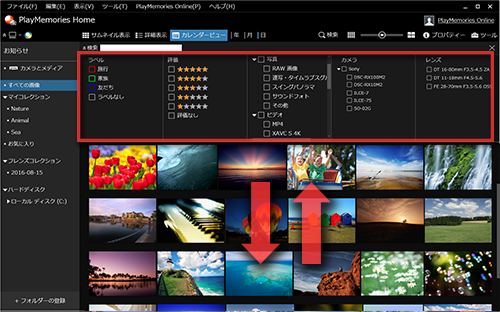
Even if a large number of photos are imported, photos/videos can be displayed in a clean list separated by which camera or lens they were taken with. The list display can be used instead of folder views, allowing you to find photos easily.
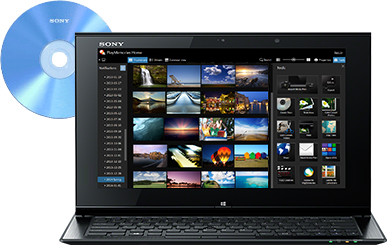
You can not only import/export the photos and videos,
but also create the disk and print.
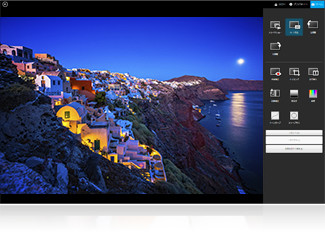
Red eye correction and trimming for photos, cutting and merging of videos, and
creating the still image from the video can be performed easily.
※Depending on your country or region, there is a function that can not be used.