

 Visual Story
Overview
Visual Story dramatically improves workflows for photographers and video creators. Images are transferred automatically to the smartphone and can be easily selected and edited, enabling fast on-site production and delivery of story galleries. Use the live gallery feature for automatic real-time sharing of galleries with AI-selected photos as they are captured at events. Social media posting is supported, so the clients can share special memories with their families and friends on the same day, which will please their guests to satisfy clients.
Visual Story service overview
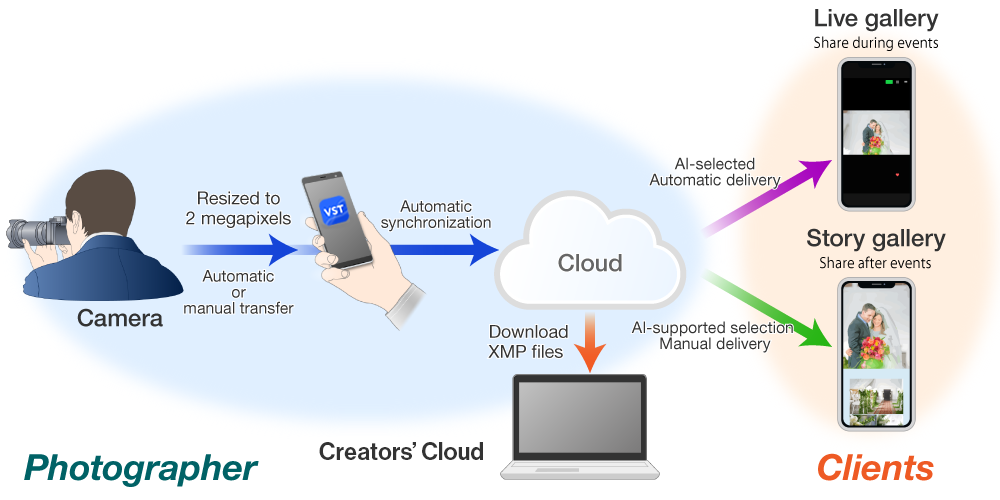
Live gallery
The photos you shoot are analyzed and selected using AI, then uploaded automatically in real time to a live gallery.
- The photographer can decide whether or not to create live galleries.
- The only operations the photographer performs are starting and stopping streaming.
- Each live gallery is active for 24 hours, and only photos are supported.
Story gallery
This is a gallery containing images selected after the event by the photographer for delivery to the client.
- Each story gallery is active for one year, and both photos and movies are supported.
- Movies must be transferred manually. (Excluding ILCE-7M4. 7M4 allows automatic movie transfer.)
Visual Story workflow
Operations in the app (on the camera and mobile device)
1. Initial setup
2. Preparation
This preparation is required before each event.
- 2-1. Project creation iOS Android
- 2-2. Image file format iOS Android
- 2-3. Import destination setting for FTP connections iOS Android
- 2-4. Image transfer setting iOS Android
- 2-5. Setting and applying Auto Retouch (Photos Only) iOS Android
- 2-6. [Watermark] setting iOS / Photographer Information Settings Android
- 2-7. Live Gallery settings iOS Android
3. First steps on the day of shooting
Shooting, selection, and upload
These steps are done in Visual Story on the day of shooting.
- 3-1. Steps before shooting iOS Android
- 3-2. Shoot iOS Android
- 3-3. Importing images iOS Android
- 3-4. Select images iOS Android
- 3-5. Creating an story gallery for editing iOS Android
- 3-6. Subsequent project editing iOS Android
- 3-7. Project and cache deletion iOS Android
- 3-8. Changing initial settings later iOS Android
Operations in the story gallery (in a browser on the mobile device)
Linkage with other applications (in a browser on a computer)
Information such as ratings and flags set in Visual Story can be downloaded as an XMP file and applied to RAW files saved on a computer. This can streamline your work in other applications. Use these features as needed.
5. Linkage with other applications
